This package provides:
- hyperclick@0.1.0
- definitions@0.1.0
- code-actions@0.1.0
- outline-view@0.1.0
- code-highlight@0.1.0
- find-references@0.1.0
- intentions:list@1.0.0
- intentions:highlight@1.0.0
- autocomplete.provider@2.0.0
This package consumes:

Made for Pulsar!
This package was written specifically for Pulsar and did not exist in the Atom package repository.
This is a fork of the unmaintained atom-typescript
(unmaintained as of May 2022, see @lierdakil's note
there), rebranded and actively maintained for Pulsar.
As of the TS7/LSP migration, the package talks to TypeScript 7's native compiler in
--lsp mode (tsc --lsp --stdio) instead of the classic tsserver JSON protocol. A
few features are temporarily degraded as a result (project-wide build, compile on
save — see AGENTS.md), and there's a known upstream typescript-go crash under
some real editing traffic still being tracked down. See REWORK.md for the full,
current status of what's working, what's broken, and what's in progress. If you're
an AI agent working in this repo, read AGENTS.md first.
JavaScript developers can now just open a .ts file and start hacking
away like they are used to. No grunt, no Visual Studio. Just pure
coding.
typescript-pulsar from Pulsar's package manager (Settings → Install),
or ppm install typescript-pulsar (ppm needs git in your path).Dependencies:
Pulsar-TypeScript relies on some external packages for providing some of its GUI. You basically have two options.
Option 1: Install atom-ide-ui package (or the individual atom-ide-*
packages it bundles: atom-ide-outline, atom-ide-datatip, atom-ide-definitions,
atom-ide-hyperclick, atom-ide-signature-help, atom-ide-code-format).
Option 2: Install the following packages:
linterlinter-ui-defaulthyperclickintentionsAdditional Notes: Some packages we
love
(from upstream atom-typescript; still broadly applicable).
Featured on the TypeScript home page under tools http://www.typescriptlang.org/ and demoed by Anders Hejlsberg.
"I was shocked at how good it felt to poke around on the compiler with
it." Jonathan Turner
"And guess what, it
worked perfectly. Like everything else! Faster than Visual Studio!"
Daniel
Earwicker
"It's
a thing of beauty - they had me at 'Type information on hover'.
Discovering tsconfig.json support as well was just an enormous bonus."
John Reilly
"This may be your best
option for editing TypeScript at the moment - very nice!" Rasmus
Schultz
tsconfig.json)package.json SupportSee docs/faq.md.
Internally using AutoComplete+. Just start typing and hints will show
up. Or you can explicitly trigger it using ctrl+space or cmd+space.
Press tab to make a selection.
Just hover

When "compileOnSave": true is set in tsconfig.json, TypeScript files
will be compiled and saved automatically. The compiler does its best to
emit something, even if there are semantic errors in the file.
atom-typescript supports all the same options the TypeScript compiler
does as it's using it behind the scenes to do all of the heavy lifting.
In fact, atom-typescript will use the exact version of TypeScript you
have installed in your node_modules directory.
Shortcut: ctrl+alt+l or cmd+alt+l. Will format just the selection
if you have something selected otherwise it will format the entire file.
Shortcut: F12. Will open the first declaration of the said item for
now. (Note: some people call it Go to Definition)
Shortcut shift+F12. Also called find usages.
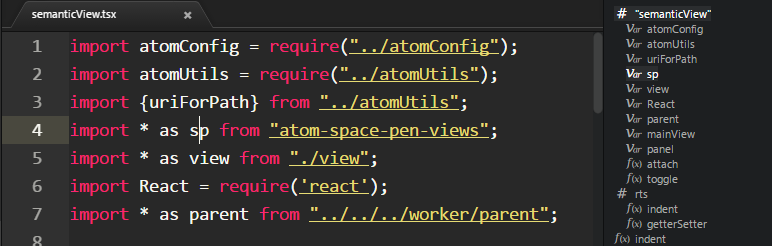
A bird's eye view of the current file. Use command
toggle semantic view. The view updates while you edit the code. You
can also click to jump to any portion of the file.
f2 to initiate rename. enter to commit and esc to cancel.

Shortcut : ctrl+enter on a Mac and alt+enter for Windows and Linux
when using intentions, alt+a when using atom-ide-ui. Currently
available codefixes:
https://github.com/Microsoft/TypeScript/tree/master/src/services/codefixes
Atom's symbols-view package only works with ctags. This is obviously
unsuitable for TypeScript. Hence, we provide two commands to emulate
symbols-view:
typescript:toggle-file-symbolstypescript:toggle-project-symbolsBoth are bound to the same keys as corresponding symbols-view commands
by default:
ctrl-r and ctrl-shift-r on PCcmd-r and cmd-shift-r on MacLook at CONTRIBUTING.md to get started. If you're an AI agent, read AGENTS.md first.
Breaking changes and release notes: CHANGELOG.md. For the current state of the TS7/LSP migration specifically (what's fixed, what's still broken, what was tried and abandoned), see REWORK.md.