This package was written specifically for Pulsar and did not exist in the Atom package repository.
Atom TypeScript
JavaScript developers can now just open a .ts file and start hacking
away like they are used to. No grunt, no Visual Studio. Just pure
coding.
NOTE: When updating to v12, make sure language-typescript core
package is enabled. We're discontinuing our own grammar in favor of
language-typescript. Both are very similar and are basically
Microsoft's TextMate grammar repackaged, and there's little reason to
bundle our own if there's one available by default.
NOTE: This branch contains a major rewrite (v11) of the
pulsar-typescript plugin that is lighter and faster, but lacks a few
major features that you might miss. The previous version is still
available in the legacy branch and will continue to receive minor
bugfixes. However, I wouldn't count on any new developments for that version.
apm install pulsar-typescript (apm needs git in your path).
Fire up atom. Open a TypeScript file.
Dependencies:
pulsar-typescript relies on some external packages for providing some of
its GUI. You basically have two options.
Option 1: Install atom-ide-ui package.
Option 2: Install the following packages:
linter
linter-ui-default
hyperclick
intentions
Features
Autocomplete
Live error analysis
Type information on hover
Compile on save
Project Context Support (tsconfig.json)
Project Build Support
package.json Support
Goto Declaration
Find References
Semantic view
Block comment and uncomment
Rename refactoring
Common Snippets
Alternative to symbols-view
FAQ
Located online:
https://github.com/albert200000/pulsar-typescript/blob/master/docs/faq.md
Feature Details
Auto Complete
Internally using AutoComplete+. Just start typing and hints will show
up. Or you can explicitly trigger it using ctrl+space or cmd+space.
Press tab to make a selection.
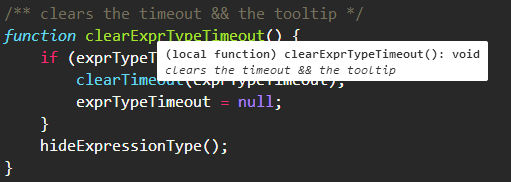
Type information on hover
Just hover
Compile on save
When "compileOnSave": true is set in tsconfig.json, TypeScript files
will be compiled and saved automatically. The compiler does its best to
emit something, even if there are semantic errors in the file.
Project Support
pulsar-typescript supports all the same options the TypeScript compiler
does as it's using it behind the scenes to do all of the heavy lifting.
In fact, pulsar-typescript will use the exact version of TypeScript you
have installed in your node_modules directory.
Go to Declaration
Shortcut: F12. Will open the first declaration of the said item for
now. (Note: some people call it Go to Definition)
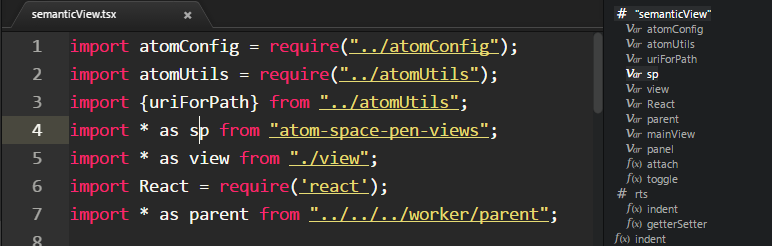
Semantic View
A bird's eye view of the current file. Use command
toggle semantic view. The view updates while you edit the code. You
can also click to jump to any portion of the file.
Refactoring
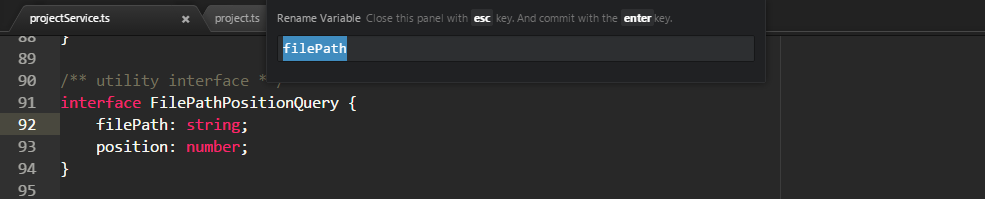
Rename
f2 to initiate rename. enter to commit and esc to cancel.
Quick Fix
Shortcut : ctrl+enter on a Mac and alt+enter for Windows and Linux
when using intentions, alt+a when using atom-ide-ui. Currently
available codefixes:
https://github.com/Microsoft/TypeScript/tree/master/src/services/codefixes
Alternative to symbols-view
Atom's symbols-view package only works with ctags. This is obviously
unsuitable for TypeScript. Hence, we provide two commands to emulate
symbols-view:
typescript:toggle-file-symbols
typescript:toggle-project-symbols
Both are bound to the same keys as corresponding symbols-view commands
by default:
ctrl-r and ctrl-shift-r on PC
cmd-r and cmd-shift-r on Mac
Contributing
Look at
CONTRIBUTING.md
for curiosity. We work hard to keep the code as approachable as possible
and are highly keen on helping you help us.