- save
- hook
- run
- exec
- command
- action
- shell
- system
- os
Save Actions
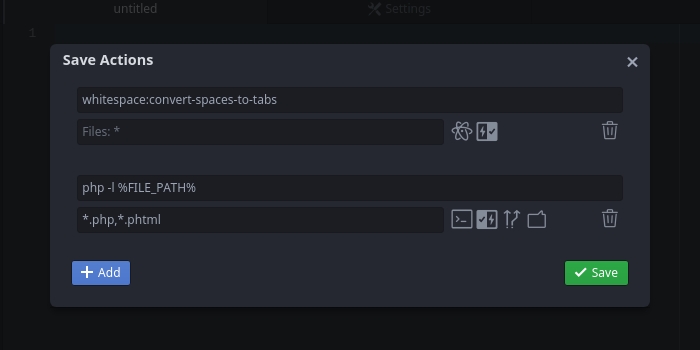
This is a package for the Atom text editor to run the specified commands when saving a file.
Features
- GUI for editing command list;
- Run Atom and system shell commands;
- Run commands before and after saving a file;
- Run commands only when a filename matches a pattern;
- Run commands with file path placeholders;
- Run system shell commands asynchronously;
- Display the results of system shell commands as a notification;
Usage
Editing the command list
Select the "Save Actions" sub-item in the "Packages" main menu item to open the command list editing window. In this window you can add commands with the desired properties, edit and delete them.
Press the "Save" button to apply the changes or just close the window to discard them.
Using placeholders
You can use the following placeholders to specify the file path in commands
(e.g. echo "File %FILE_NAME% from folder %FILE_DIR% has just been saved!"):
| Placeholder | Description | Example value |
|---|---|---|
%FILE_PATH% |
The absolute file path. | /home/dev/projectX/lib/core.js |
%FILE_DIR% |
The absolute path to the file's directory. | /home/dev/projectX/lib |
%FILE_NAME% |
The full filename. | core.js |
%FILE_NAME_BASE% |
The base filename. | core |
%FILE_NAME_EXT% |
The file extension. | .js |
%PROJECT_DIR% |
The absolute path to the project's directory. | /home/dev/projectX |
%PROJECT_FILE_PATH% |
The relative path to the file in the project. | lib/core.js |
%PROJECT_FILE_DIR% |
The relative path to the file's directory in the project. | lib |
Acknowledgments
- Octicons (GitHub) - SVG icon set;
- Photon Icons (GitHub) - SVG icon set;
- Navigation by Pixelmeetup - SVG icon set;
- SVGOMG! (GitHub) - Web GUI for SVG optimiser SVGO;
- IcoMoon App - Icon font, SVG, PDF and PNG generator;
Support Save Actions
If you use Save Actions and it makes your life better or you just like it and you want it to continue to be supported and developed, please donate to BTC: 3MxqMNvZGLyFKkQ62WSiVXmaYLuwNv5Tpj