
This package provides:
Linter-Travis-Lint

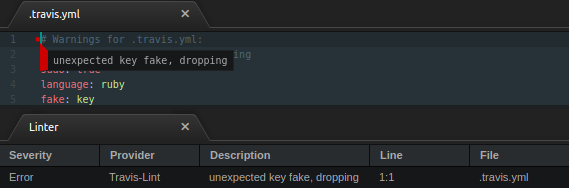
Linter-Travis-Lint aims to provide functional and robust travis lint linting functionality within Atom/Pulsar.
APM (Atom) and PPM (Pulsar) Support
apm was discontinued prior to the sunset by the Atom Editor team. ppm for Pulsar does not yet support package publishing. Therefore, the installation instructions are now as follows if you want the latest version in Atom, Atom Beta, or Atom Dev:
- Locate the Atom or Pulsar packages directory on your filesystem (normally at
<home>/.{atom,pulsar}/packages) - Retrieve the code from this repository either via
gitor the Code-->Download ZIP option in Github. - Place the directory containing the repository's code in the Atom or Pulsar packages directory.
- Execute
npm installin the package directory (requires NPM). - Repeat for any missing or outdated dependencies.
and Pulsar:
- Install the old version of the package as usual with either PPM or the GUI installer in the editor.
- Locate the Atom or Pulsar packages directory on your filesystem (normally at
<home>/.{atom,pulsar}/packages) - Replace the
lib/main.jsfile in the package directory with the file located in this remote Github repository.
Additionally: this package is now in maintenance mode. All feature requests and bug reports in the Github repository issue tracker will receive a response, and possibly also be implemented (especially bug fixes). However, active development on this package has ceased.
Note that at this current time the package unit tests (outside of CI which will be Atom Beta 1.61.0 for the time being) and acceptance testing are performed with the latest stable version of Pulsar.
Installation
The travis gem is required to be installed before using this. The Linter and Language-YAML Atom packages are also required. If you have installed the Language-Ansible package, this package is still compatible with its identifying of .yml as Ansible files.
Usage
- All files named
.travis.ymlwill be linted with this linter. Some output may be redundant with YAML linters, such as the syntax checker.